What Is Email Spoofing? How Attackers Fake a Trusted Sender
You get an email from your CEO asking you to wire funds for a confidential deal. Or from IT, asking you to “verify your password” before your account gets locked. Or from a vendor you’ve paid a dozen times before, except this time the bank details have changed.
The email address looks right. The name looks right. The tone sounds like them. And none of it is real.
This is email spoofing — and it’s the technique behind most of the costly, headline-making email fraud you hear about, from business email compromise (BEC) to executive impersonation to fake IT support scams. Here’s exactly what it is, why it’s so easy to pull off, and how to catch it before you act on it.
What email spoofing actually is
Email spoofing is the practice of forging the sender information on an email so a message appears to come from someone other than its actual source. The attacker isn’t hacking into the real sender’s account — in true spoofing, they never touch it at all. They’re simply writing a fake return address on the envelope, the same way anyone could scrawl a stranger’s name on a piece of physical mail.
That distinction matters. Spoofing is often confused with account compromise, where an attacker actually gains access to someone’s real inbox and sends from it. Both produce a fraudulent email that looks legitimate, but they’re different problems with different fixes — spoofing is stopped by verifying sender authenticity in transit, while compromise is stopped by securing the account itself (strong authentication, monitoring for suspicious logins, and so on).
Why spoofing works: email was never built to verify who’s sending it
Email’s underlying protocol, SMTP, was designed in the early 1980s, when the internet was a small, trusted network of research institutions. Nobody building it anticipated the need to verify that a sender was who they claimed to be — so it simply doesn’t check. The “From” field in an email is, by default, about as trustworthy as the return address field on a paper envelope: whatever the sender types in, that’s what shows up. No identity verification happens unless the receiving mail server specifically goes looking for it.
That’s the entire vulnerability, in one sentence: the protocol trusts what the sender claims, not what’s actually true.
Email authentication standards — SPF, DKIM, and DMARC — exist specifically to close this gap by giving receiving servers a way to check a claimed sender against records the real domain owner has published. When they’re configured correctly and a receiving server actually enforces them, most crude spoofing gets caught automatically. When they’re missing, misconfigured, or simply not enforced (which is more common than you’d expect, even at large organizations), spoofed mail sails through untouched.
Four ways attackers fake a trusted sender
Spoofing isn’t one technique — it’s a family of them, ranging from trivially easy to genuinely sophisticated.
1. Header spoofing. The most direct method: the attacker connects to a mail server and manually writes whatever they want into the “From” field, because nothing forces it to match reality. This is the classic, textbook definition of spoofing, and it’s exactly what SPF, DKIM, and DMARC were built to catch.
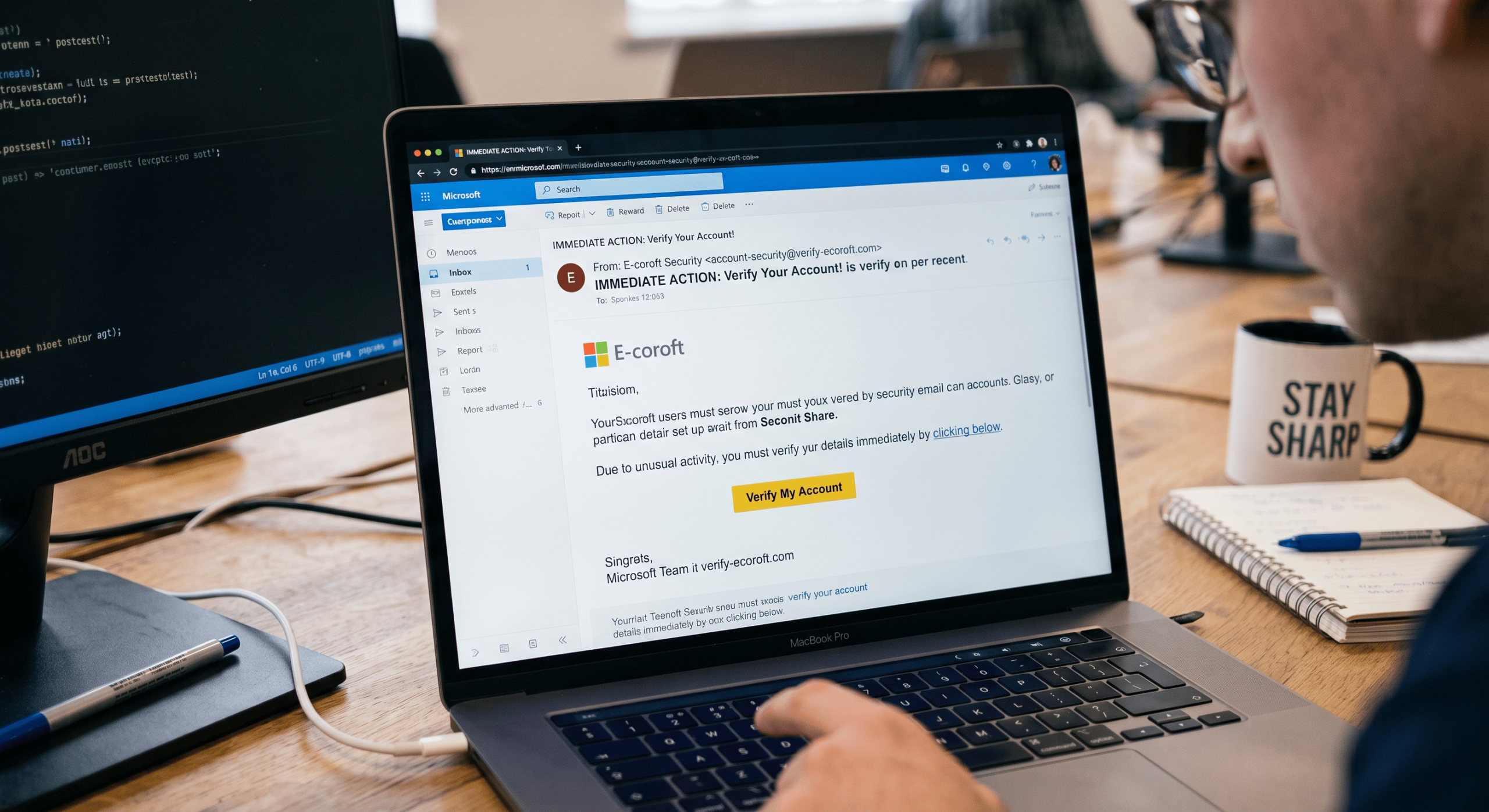
2. Display name spoofing. This is the one that catches the most people, because most email clients — on both desktop and mobile — show the sender’s display name prominently and tuck the actual email address away behind it. An attacker sets their display name to “Jordan Reyes, CFO” while the real address underneath is something like jordan.r847@freemailservice.com. Unless you tap or hover to reveal the full address, you never see the mismatch. This technique doesn’t even require defeating SPF/DKIM/DMARC, since the attacker can send from a completely legitimate account under their own control — they’re not forging the technical sender, just the name humans actually look at.
3. Lookalike (typosquatted) domains. Instead of impersonating your exact domain, the attacker registers one that’s visually almost identical — swapping a letter (rnicrosoft.com where “rn” mimics “m”), adding a hyphen (yourbank-support.com), or using a different top-level domain (yourcompany.co instead of .com). Because it’s a domain the attacker genuinely owns, it can pass SPF and DKIM checks with flying colors — the authentication is technically valid, it’s just authenticating the wrong domain. Catching this one comes down to reading the address carefully, not just recognizing it at a glance.
4. Reply-chain hijacking. A more advanced variant: the attacker either compromises a real mailbox or spoofs convincingly enough to insert themselves into an existing, legitimate email thread — then continues the conversation as if they were one of the original participants. Because the thread has genuine history, correct context, and familiar names, it’s one of the hardest spoofing variants to catch by eye.
How SPF, DKIM, and DMARC try to stop it
Without going deep into the technical weeds here (that’s its own article), the short version: SPF lets a domain publish which mail servers are allowed to send on its behalf, DKIM lets a domain cryptographically sign outgoing mail so receivers can verify it wasn’t altered in transit, and DMARC ties the two together and tells receiving servers what to do when a message fails both — reject it, quarantine it, or just monitor it.
The catch is that all three depend on the receiving server checking and enforcing them, and on the sending domain having configured them correctly in the first place. A message that fails every one of these checks can still land in an inbox if nothing downstream is actually looking.
Warning signs you can spot without any technical tools
Most spoofed emails share tells, even when the display name and subject line look perfect:
- The sender’s actual address doesn’t match the display name. Tap or hover over the sender name to reveal the real address before trusting anything in the message.
- A reply-to address that’s different from the sender address. Legitimate senders rarely need this; attackers use it to route your reply somewhere they control.
- Urgency and pressure. “This needs to happen before end of day,” “don’t tell anyone else about this yet,” “call me right now” — manufactured urgency is designed to short-circuit the moment you’d normally pause and verify.
- A request that breaks normal process. A CEO who’s never personally handled a wire transfer suddenly emailing you directly about one is a bigger red flag than any technical detail.
- Generic greetings on an email that claims a personal relationship. “Dear Customer” from your “long-time vendor” doesn’t add up.
What to do if you spot one
Don’t reply, and don’t click anything in the message — a reply goes straight to the attacker, not the real person. Verify the request through a separate, known channel: call the person using a number you already had on file, not one in the email. Report it to your IT or security team so they can check whether others received the same message. And if it impersonated a specific person inside your organization, let that person know their name is being used, since it’s often the first sign of a broader campaign.
Where this leaves you
Spoofing works because it exploits a gap between what a protocol technically allows and what a human glancing at their inbox assumes is true. Authentication standards close part of that gap at the infrastructure level; a healthy habit of checking the real sender address before acting on urgency closes the rest of it at the human level.
That’s also the gap SpoofShield is built to close automatically — flagging domain spoofing, lookalike addresses, and display-name mismatches in real time inside Outlook and your browser, rather than leaving it to a careful read of the sender field. If you want to see the full list of what it checks for, our features page breaks down all eight detection categories, and pricing starts at $6.99 per user per month with no minimum seats.